
Knowing what to fix first
Most security tools tell you what has already happened. An alert fires, someone investigates and the work is reactive by design.
The harder question comes before that. Out of everything in your environment that could be a challenge, what should be prioritised? Most IT teams have more findings than they could ever action and no reliable way to rank them.
Cyber Risk Exposure Management (CREM) has been build to address this gap. It looks across your environment, works out which exposures an attacker is most likely to use and puts them in order.
A straightforward upgrade
Moving on from Trend Micro Worry-Free Advanced to Trend Vision One is a straightforward upgrade that gives you a far more capable security platform. Beyond industry-leading endpoint protection, Trend Vision One provides unified visibility across endpoints, email, cloud, identity and networks, enabling faster threat detection and response through AI-driven security analytics.
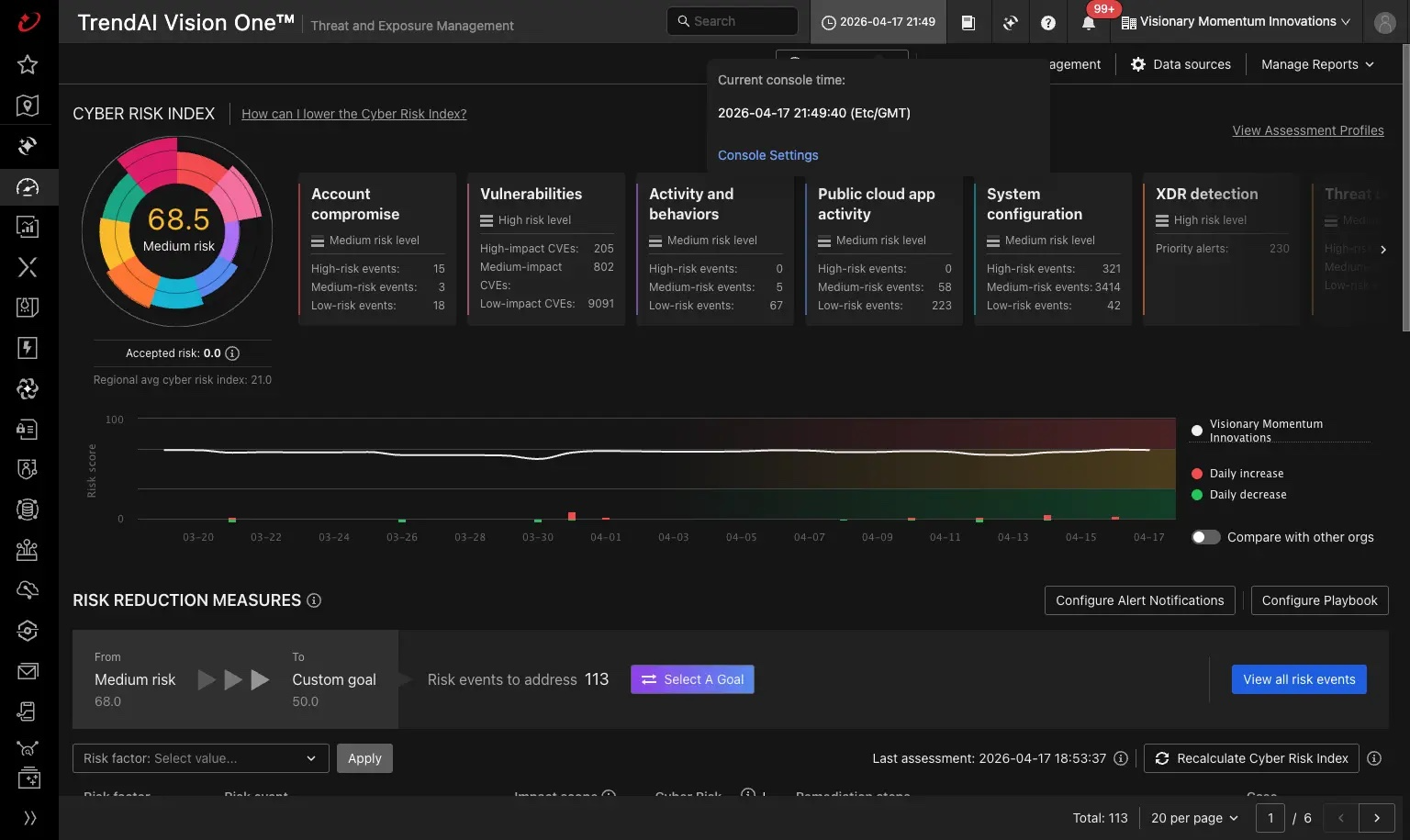
One score, the areas driving it and a target to work toward. Screen shown is a TrendAI demonstration environment.
What you actually see
CREM gives you a single cyber risk score for your organisation and shows you what is driving it.
Underneath that score, your risk is broken into areas you can recognise: vulnerabilities, system configuration, account compromise, cloud application activity and threat detection among them. Each carries its own risk level, so you can see at a glance whether the pressure is coming from unpatched software, a configuration that has drifted or something behaving oddly in a cloud service.
Individual findings are graded by impact rather than listed flat, which is what makes the difference in practice. A few thousand low-impact items and a handful of high-impact ones are very different problems and they should not arrive looking the same.
You can also set a target. Choose the score you want to reach and CREM tells you how many items you need to address to get there, then tracks the movement over time. Turning security from a sometimes open-ended task into something with a finish line you can report against.
What are the benefits?
CREM can help you:
Finding the problem is half the job
A risk platform will tell you what needs attention but it will not patch the server, tighten the configuration or sit down with your team and decide what to do first.
For customers already running Trend Micro Worry-Free Advanced, this is an upgrade to a platform you are part-way into rather than a new system to learn.
